
Been PSP'n for some years now and I tend to forget that
some of you are just starting out and need things explained better
so I'm making this one to refer to for those
who are beginners with Animation Shop 3
First let's look at File - Preferences - General Program Preferences
Here are the settings mine is set too.


Paste after current

is this buttons function, you just hit it to add the next layers
behind your current one, every time you copy a new one
from PSP
View Animation
 Hit this button to see the animation, and then go on to save it.
When you're ready to save an animation File - Save as...
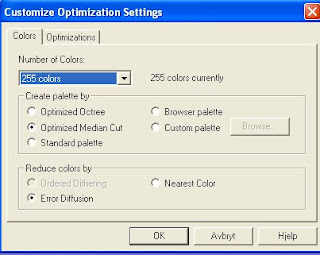
hit customize... when you're on the box you see below
hit customize... when you're on the box you see below

The only thing I might change on the 2 boxes you see below is to vary
between Optimized Octree and Optimized Median Cut (in the first bow below)
Depending on if the first save looks grainy I might try the other option
to see it it looks better.
Other than that you don't have to go in here every time you save
just hit Next on all the boxmessages you get in your saving process.

Think I've managed to cover most of the general things you need
to do my tuts ;)
If you have other things you need explained don't hesitate to ask
I might be able to help ;)

