

This tutrial is written by me using PSP 10 and Animation Shop 3
Any similarities to other tutorials is purely coincidental and unintentional.
All materials and tubes used are copyright to their respective owners.
Supplies
Purple Metallic Frame here
Glitter Doodles here
Mask nr 1 here
Wordart here
Licensed artist work is by Martin Abel
Plugins used
VDL Adrenalin - Camouflage
Let's start
Open a new canvas 570x450 flood fill it white
Add the frame and your tube of choise, place them to your liking.
Add a new raster layer above the white background flood fill it with
the color of your choise, I picked #ac3992 from one of the butterflies,
then add the mask, merge group and blur it (adjust - blur - blur)
Use the selection tool or rectangle to select inside the frame, add a new
raster layer and flood fill it with whatever color you have (we're changing it soon)
Duplicate it 2 times and add VDL Adrenalin with the settings below
hit the first 4 color boxes and pick a color from your tag. for the next 2 layers
just push the Random button to change the pattern.
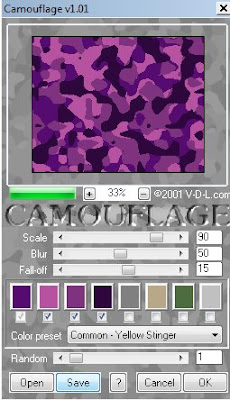
Add blur to all 3 layers (adjust - blur - blur)
Add doodles behind the frame.
Add the wordart, change color on it and give it a drop shadow
Add the wordart, change color on it and give it a drop shadow
(1,-1,60,3)
Add you name, I used the font Procyon and gave it a subtle white
glow using Eye Candy 5 -Impact - Gradient Glow.
I also gave the tube some noise parts but that's all up to you ;)
Remember to add the proper ©
Merge visible and copy, paste as new animation in Ani Shop
Undo in PSP and open the next layers for animation, closing
the ones you've used.
the ones you've used.
Select all 3 frames (Ctrl+A) and change frame properties to 25
before saving it
And you're done!
Hope you've enjoyed it.
If you have any questions don't be affraid to ask them in a comment below
or if you just wanna show it off, please do so and I'll add them to the show off on the side ;)
Tutorials are © Tutorials by Vaybs

